
手元にあった温度センサーLM60を使って、10分毎にTwitterに温度をつぶやくようにしました。
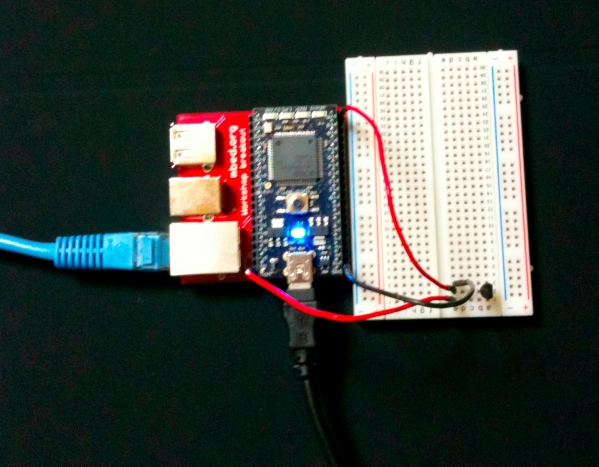
mbed+lm60+twitter
同じ内容を投稿できないようなので、連番を付けて書き込むようにしています。
LM60に3.3Vを入れて、mbedのpin20で入力を受けています。
温度は次のように計算しています。
temp = (ain * 3.3 – 0.424) / 0.00625;
mbedへのUSBは電源供給のためのもので、USB出力のACアダプターにつながっています。
ソースコードは次の通り。
/*
  Update: 21-06-2010
  The basic authentication service for twitter is going down at the end of the week.
  To continue using that program, the code has been updated to use http://supertweet.net which acts as an API proxy.
  Simply visit the website to setup your twitter account for this API.
  See: http://www.supertweet.net/about/documentation
*/

#include "mbed.h"
#include "EthernetNetIf.h"
#include "HTTPClient.h"

EthernetNetIf eth;
AnalogIn ain(p20);
DigitalOut myled(LED3);

int main() {

  printf("Init\n");

  printf("\r\nSetting up...\r\n");
  EthernetErr ethErr = eth.setup();
  if(ethErr)
  {
    printf("Error %d in setup.\n", ethErr);
    return -1;
  }
  printf("\r\nSetup OK\r\n");

  char buf[32];
  float temp;
  int counter = 0;
  while (1) {
    temp = (ain * 3.3 - 0.424) / 0.00625;
    sprintf(buf, "temp = %4.1f now(%d). #myroomtemp", temp + 0.05, counter++);

    HTTPClient twitter;

    HTTPMap msg;

    //msg["status"] = "mbed no proguramu de kaiteimasu!"; //A good example of Key/Value pair use with Web APIs
    msg["status"] = buf; //A good example of Key/Value pair use with Web APIs

    twitter.basicAuth("ID", "パスワード"); //We use basic authentication, replace with you account's parameters

    //No need to retieve data sent back by the server
    HTTPResult r = twitter.post("http://api.supertweet.net/1/statuses/update.xml", msg, NULL);
    if( r == HTTP_OK ) {
        printf("Tweet sent with success!\n");
    } else {
        printf("Problem during tweeting, return code %d\n", r);
        break;
    }
    wait(10.0 * 60.0); // wait 10 min
  }

  int k = 0;
  while (1) {
    myled = k;
    k = !k;
    wait(0.3);
  }
  return 0;

}